A Fleeting Garden on Your GPU
A WebGPU physarum simulation where you can control millions of agents with your paintbrush and watch them bring your drawings to life.

Watching art emerge from millions of independent agents is fascinating for a while, but not for all that long. My favourite art makes the viewer part of the work, so this project had to be interactive to live up to my expectations. I was inspired by Sebastian Lague’s slime mould video1 and Sage Jenson’s work2, but I wanted more control over a running simulation rather than just passively observing it.
Architecture
A few compute shaders manage the agents’ lifecycle by updating an array in place. Each agent follows a simple loop. On every iteration, it takes three samples: one ahead and one on either side. It then goes straight, turns left, or turns right based on which sensor reports the strongest trail scent left behind by other agents. The samples come from a trail map that records the agents’ paths and slowly diffuses them over time. Its R, G, and B texture channels each hold deposits from one agent type. I considered using the fourth channel too, but three colours already make the result busy enough, and a fourth would’ve made colour theory a fair bit harder for my colour-blind eyes.
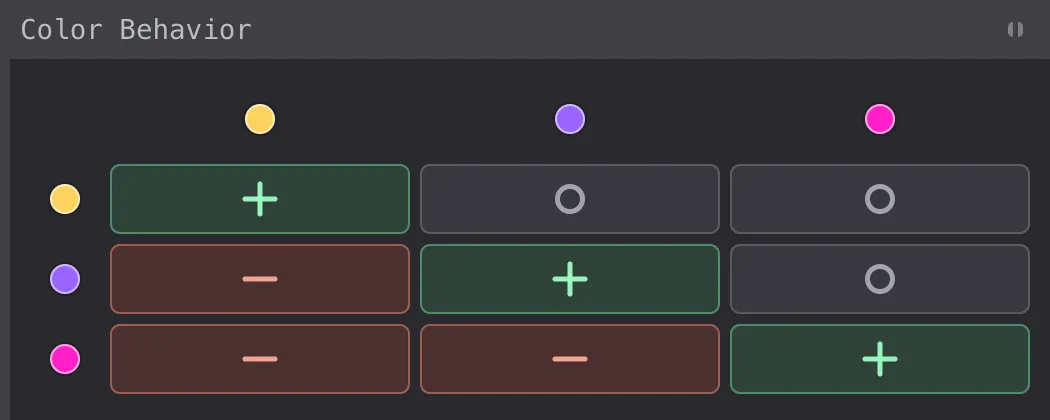
The website has multiple scenes, each with its own simulation parameters. Each scene also has a matrix that defines how every agent type responds to every other type’s trail: with attraction, repulsion, or indifference.
Make it good
My first experiment let the user draw over the trail texture, nudging the mould to change direction. That proved one layer too indirect: it barely changed the agents’ behaviour unless the effect was strong enough to make the strokes look overly thick. In the final version, drawing spawns new agents along the pen’s path. When there are too many agents on the canvas, old ones get removed as new ones arrive.
Drawing is great fun, but not everyone can draw well. No amount of line smoothing will change that, though it helped me a little. That’s why I added mirroring, a common drawing-tool feature that turns scribbles into artsy kaleidoscopic patterns.
To deepen the immersion and give each stroke more weight, I added procedurally generated piano sounds that reward drawing with increasingly complex note progressions.
I’m a firm believer that small touches give experiences polish. For instance, the toolbar samples a 13×7 grid of pixels behind it and adjusts its opacity to stay legible against any background. And the first thing a visitor sees is 180,000 agents drawing the word Fleeting with their trails, then wandering off as the simulation takes over and the letters fall apart.
Then make it fast
The simulation is split into six conditional compute-and-render stages across ten WGSL files: agent step, diffusion and decay, brush, eraser (one variant clears trails, the other removes agents), agent generation with resizing and compaction, and the final palette render.
The first step in making shaders fast is to keep the logic simple and mostly branch-free. A few other ideas helped too:
- Agents write deposits directly to a storage texture without blending, which concurrent compute writes don’t support anyway. This is deliberately racy: if two agents target the same texel, WGSL does not guarantee which value survives, or even that the result behaves like a simple last-writer-wins update. In practice, the next diffusion pass spreads the surviving deposit across neighbouring pixels, so we don’t need to sacrifice parallelism.
- Keeping the agents packed together in memory took more care. During compaction, each workgroup uses a prefix sum to find positions for its surviving agents, so compaction needs just one atomic operation per workgroup instead of one per agent.
- The agent count also adjusts to the frame rate. It starts at a million and drops by 200,000 per second when the smoothed rate falls below 54 FPS (90% of the 60 FPS target), down to a minimum of 50,000. A weaker device gets a thinner garden instead of a slideshow.
Give it a try
A blog post can only do so much to describe an immersive artwork. The best way to understand it is to try it, preferably with the sound on: fleeting.schmelczer.dev3.
- Sebastian Lague’s slime mould video: https://www.youtube.com/watch?v=X-iSQQgOd1A↩
- Sage Jenson’s work: https://cargocollective.com/sagejenson/physarum↩
- https://fleeting.schmelczer.dev/↩