50 FPS Game Engine on an 8-Bit Microcontroller
A handheld game built from the PCB up: ATtiny85V, OLED, IR receiver. 8 MHz, 512 bytes of RAM, and a charming atmosphere.

I grew up playing with little gadgets: fake Tamagotchis, Game Boy imitations with 100+ built-in games, and the like. Naturally, I wanted to build my own.
The game
You keep a broken spaceship alive. Asteroids drift past; you mine them and spend the points on upgrades. Each upgrade unlocks either a station with a new capability or a crewmate to automate a station for you.
The hardware
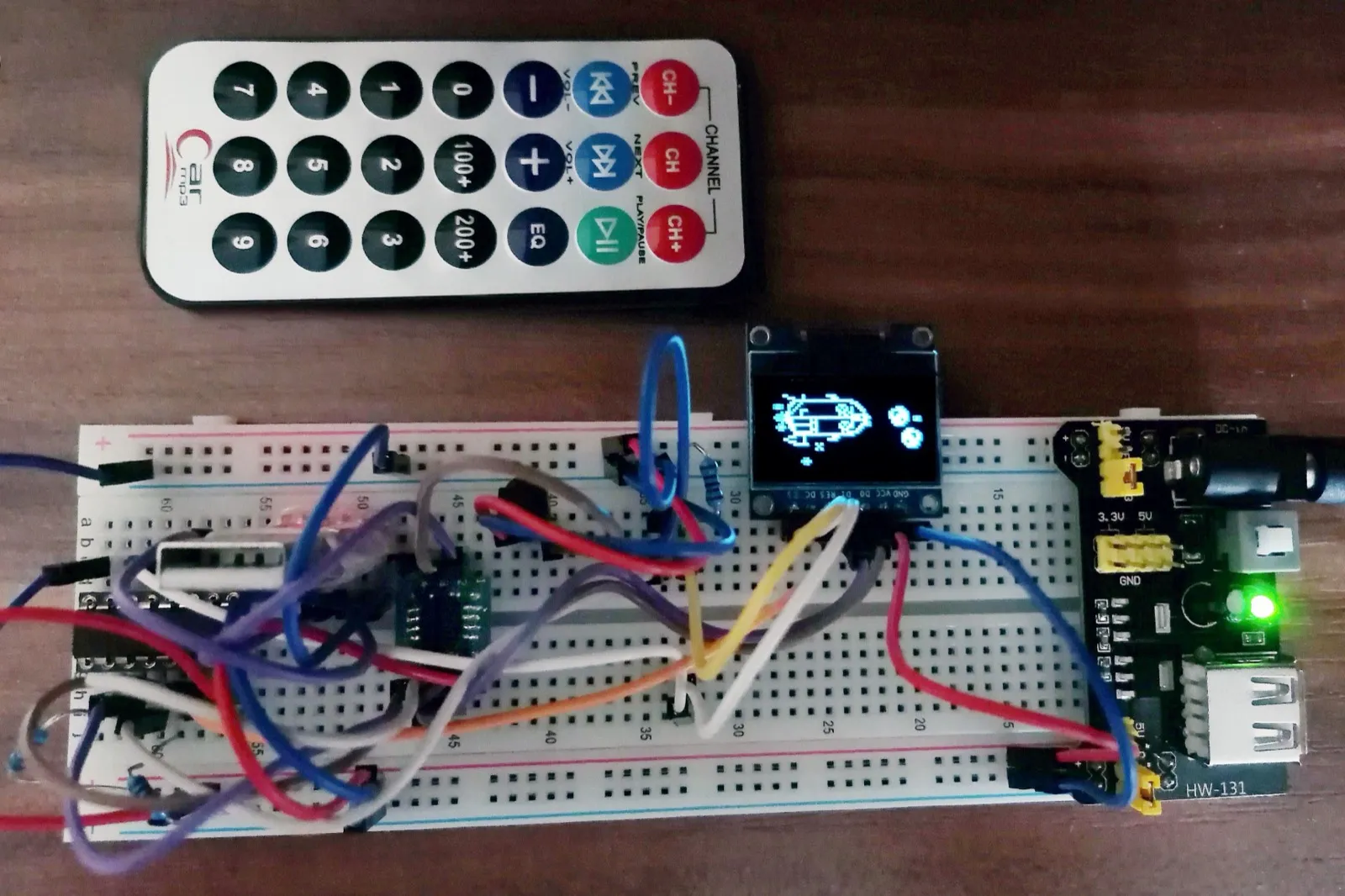
I settled on the ATtiny85V1, driving a common 128×64 1-bit OLED2. To keep the footprint small, I used a TSOP4838 IR receiver and a compact decoder for the NEC protocol instead of built-in buttons or a joystick. Mine was paired with a generic hi-fi remote I bought on AliExpress for pennies. Connecting the components was quite simple, even if my breadboard suggested otherwise:
Routing the PCB from this design was relatively straightforward. The real challenge was the firmware.
Reality check
I had planned an open world, “advanced” AI, and more, but I quickly got a reality check. Even after bit-packing, the framebuffer alone would’ve needed twice the microcontroller’s 512 bytes of RAM. The 8 KB of program memory left little room for grand ambitions either. Still, I made it work.
Rendering engine
To achieve 50 FPS and fit into RAM, the engine renders at a quarter of the display’s resolution (64 by 32 pixels). The OLED’s zoom setting doubles the image vertically, while sending each byte twice over the wire doubles it horizontally. This gives nearest-neighbour upscaling without storing any extra pixels.
The screen’s pixels are either on or off, so 1 bit per pixel should be enough. But a rendering engine also needs compositing, which requires a second bit per texel to represent transparency. That’s what lets the black pixels inside the spaceship’s sprite hide the stars behind them, while the black pixels outside it stay transparent and let the stars show through.
A shortcoming of the sprite format is that it uses 2 bits per texel for only three distinct results: black, white, and transparent. The two possible encodings of white produce the same output regardless of what’s behind them.
A complete 64 × 32 one-bit framebuffer would still consume 256 of the microcontroller’s 512 bytes, leaving too little room for the game state. The pragmatic choice would’ve been a bigger microcontroller, but hobby projects don’t always have to be pragmatic. Instead, the renderer keeps a 64-byte buffer for one 8-pixel-high stripe. It renders the frame in four passes, with each byte operation compositing eight vertical pixels in a SIMD-like fashion.
Sprites are stored as 16-bit columns: the high byte is a mask, and the low byte contains the fill bits. Compositing eight vertical pixels of a sprite onto the stripe buffer is a single expression:
newColumn = (oldColumn & transparencyMask) | fill;The sprites are C arrays injected into the source code by a Python script, so the somewhat strange layout doesn’t leak into the sprite creation workflow.
Game logic
For the game engine’s scripting model, I borrowed ideas from JavaScript prototypes3 and Unity objects4. Of course, the size constraints allowed only a lightweight version. All game objects live in one array. Each object holds a union of possible object states and a pointer to its actual prototype: essentially a virtual function table5 containing the object’s tick (to update the object and interact with others on every game tick) and draw functions. Although simulation and rendering share the same 50 Hz tick, they need separate functions because draw renders one 8-pixel stripe at a time and may run several times per object per frame. This quasi-vtable doesn’t become a bottleneck either. The beauty of the ATtiny is that it has no complex cache hierarchy which would make jumping around in memory more expensive. Everything is equally slow.
In the end, the game does have “AI” too, in the form of a finite state machine. Your astronaut crewmates have a prioritised list of activities to attempt based on the player’s current activity.
Saves
The game’s binary already fills the 8 KB of program memory, so the sprites have to live in EEPROM. There is still enough room alongside them for a save file: a few dozen bytes containing the serialised game-object list. To prevent an unexpected shutdown from corrupting the save, the EEPROM holds two save buffers and a flag identifying the last completed one. The flag flips only after the older buffer has been fully overwritten, making saves atomic. It all happens in the background through interrupts to avoid jitter in the rendering loop.
Was it worth it?
Absolutely. Don’t get me wrong, the gameplay gets old after 15 minutes. You spend the first five completing the game, then watch your crewmates run the spaceship as a soothing loop emerges from their state machines.
Reading the datasheets cover to cover, understanding the limits, and learning how to push them was incredibly fun. This is about as full-stack as a project gets, and it made me think about performance on a completely different scale from what I was used to.
By the end, though, the game and my software-UART logging code no longer fit in program memory at the same time, so I had to disable parts of the game whenever I needed logs. If I built it again, I’d start with a simulator. Skipping the flashing step would speed up iteration and make “there’s no output, what now?” failures much easier to debug. It would also enable end-to-end tests in CI. An 8 KB program can only hold so much complexity, but developing anything larger without better testing would’ve been prohibitively slow.
- ATtiny85V: https://ww1.microchip.com/downloads/en/DeviceDoc/Atmel-2586-AVR-8-bit-Microcontroller-ATtiny25-ATtiny45-ATtiny85_Datasheet.pdf↩
- 128×64 1-bit OLED: https://www.olimex.com/Products/Modules/LCD/MOD-OLED-128x64/resources/SSD1306.pdf↩
- JavaScript prototypes: https://developer.mozilla.org/en-US/docs/Web/JavaScript/Inheritance_and_the_prototype_chain↩
- Unity objects: https://docs.unity3d.com/Manual/Components.html↩
- virtual function table: https://eli.thegreenplace.net/2013/12/05/the-cost-of-dynamic-virtual-calls-vs-static-crtp-dispatch-in-c↩